Streamlining Data Processing: Using AWS Glue ETL for Weekly Uploads
AWS Glue automates extract, transform and load work without servers to provision. A walkthrough of ETL jobs, the Data Catalog, crawlers, classifiers and triggers, built around one real scenario: a weekly CSV upload deduplicated into a Glue table.

.jpg)
AWS Glue is a serverless data integration service. It helps you prepare, move and integrate data from various sources for analytics, machine learning and application development. In practice, it automates the Extract, Transform and Load (ETL) process, making data preparation easier, faster and cheaper.
Benefits of using AWS Glue ETL for data processing
- Reduced costs – you only pay for the resources you use, with no upfront infrastructure investment.
- Increased productivity – Glue automates many routine tasks, so you can focus on more strategic work.
- Improved data quality – Glue helps keep your data clean, consistent and ready for analysis.
- Greater flexibility – Glue supports a wide variety of data sources and destinations.
AWS Glue services in depth
Before we dive into a specific example, let us describe the services we chose in a little more detail.
AWS Glue ETL job
An AWS Glue ETL job is a task that handles the Extract, Transform, Load process. It extracts data from sources such as databases and data files, transforms it, and loads it into target destinations such as databases.
ETL jobs can run on a schedule or be triggered by events, such as the arrival of new data. They are fully managed: AWS handles provisioning, scaling and monitoring, so you can focus on the transformation logic instead of the underlying infrastructure.

AWS Glue Data Catalog
The AWS Glue Data Catalog is a centralized metadata repository. It acts as a registry of your data assets, giving a unified view of their location, lineage, ownership and quality.
This makes data discovery effortless, supports data governance and streamlines data management. In short, the Data Catalog is the central nervous system of your data landscape in AWS Glue.

AWS Glue workflow
AWS Glue workflows orchestrate multiple ETL jobs into one coherent data processing pipeline. These visual workflows define the sequence and dependencies between jobs, so data flows smoothly through each stage.
Workflows offer a user-friendly interface for building complex processing logic without manual scripting, and they integrate with crawlers, classifiers and Spark. The result: simpler pipelines, better data quality and deeper insights.

AWS Glue crawlers and classifiers
Crawlers act as automated scouts. They traverse data stores such as Amazon S3 buckets or databases, analyze the data and infer its structure (schema) and metadata.
Classifiers add a layer of intelligence by applying predefined or custom rules. They identify file formats (e.g. CSV and JSON), extract specific data types and categorize content. You can use built-in classifiers or create your own for specific data patterns.
Together, crawlers and classifiers automate the otherwise cumbersome work of cataloging data and preparing it for ETL.

AWS IAM
AWS Identity and Access Management (IAM) gives you granular control over user and application access to AWS resources. You manage permissions centrally, so only authorized entities can perform specific actions. Credentials such as passwords, access keys and temporary tokens keep access secure and well defined.

Amazon S3
Amazon S3 (Simple Storage Service) is a highly scalable, durable and secure object storage service. It stores virtually unlimited data in any format – documents, images, videos, logs or code. Storage classes range from frequently accessed data to long-term archives, balancing cost and performance, and S3 integrates with nearly every other AWS service.

Amazon Athena
Amazon Athena is a serverless interactive query service for analyzing data in Amazon S3 with standard SQL. It supports ANSI SQL, works with many data formats and scales automatically. Thanks to its integration with AWS Glue, it fits use cases such as log analysis, ad-hoc querying and BI reporting.

Understanding the weekly upload process
To show what AWS Glue ETL can do, let us use a real-life example.
The scenario: a weekly upload of a simplified dataset with information about vehicles. We receive CSV files with the same schema and want to keep only unique rows.
The final flow looks like this:
- Throughout the week, users upload CSV files with a large number of objects to Amazon S3.
- Once a week, an AWS Glue crawler is triggered by a schedule.
- When the crawler succeeds, it triggers the ETL job.
- The ETL job selects unique rows and appends them to the appropriate Glue table.

To build it, we connect these core AWS Glue features into one upload pipeline:
- ETL jobs
- Crawlers
- Classifiers
- Triggers
- Databases
- Tables
Setting up AWS Glue ETL for data processing
Step 1: Configure data sources and destinations
- Create the source S3 bucket.
- Create the destination S3 bucket where transformed data will be stored.
- Create an AWS Glue database.
Step 2: Create crawlers and classifiers
- Create a classifier for CSV files.
- Create a crawler with these key properties:
- Data source: the source S3 bucket
- Classifier: the one created above
- Database: the Glue database created above
- Output: a sub-directory in the destination S3 bucket
- IAM role: a dedicated role for the crawler
- Schedule: weekly
Step 3: Create the transformation job
- Create an ETL job in AWS Glue.
- Set the source to the AWS Glue Data Catalog, pointing to the raw data table.
- Add the “Drop Duplicates” transformation.
- Set the destination to the AWS Glue Data Catalog, pointing to the processed data table.
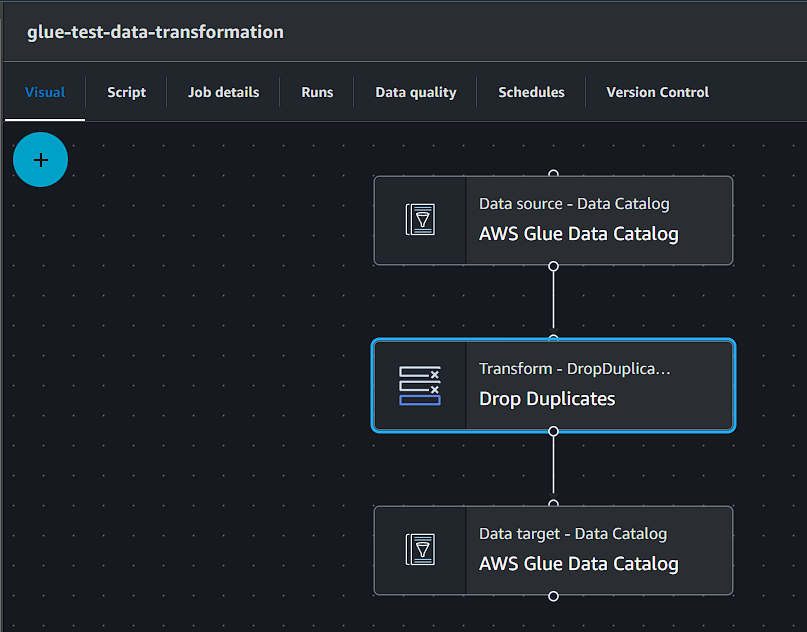
Step 4: Improve observability
- Configure S3 storage for Amazon Athena query results.
- Connect Athena to the AWS Glue database.
- Inspect both tables (raw and processed).
Step 5: Automate the weekly run
Set up a trigger that launches the ETL job when the crawler run succeeds.
Monitoring and troubleshooting
- Monitor ETL job runs and performance metrics in Amazon CloudWatch.
- Use AWS Glue logging and monitoring to troubleshoot issues during processing.
- Set up alarms and notifications for failures or performance bottlenecks.
Best practices for weekly uploads
- Tune job parameters for performance and cost efficiency.
- Use caching and partitioning to speed up processing.
- Review regularly to keep the pipeline scalable and reliable.
Conclusion and next steps
This guide gives a structured approach to setting up AWS Glue ETL for data processing. It is a foundational example – AWS Glue can do much more. As you move forward, explore more complex scenarios and additional Glue features to tailor solutions to your business needs.
FAQ
What is AWS Glue ETL used for?
AWS Glue ETL is a serverless service for extracting data from sources such as Amazon S3 or databases, transforming it and loading it into a target such as a Glue Data Catalog table. AWS provisions, scales and monitors the infrastructure, so teams only define the transformation logic. A typical use is a recurring load, for example cleaning weekly CSV uploads before analysis in Amazon Athena.
How do you remove duplicate rows from weekly CSV uploads in AWS Glue?
Point a Glue crawler at the S3 bucket with the CSV files so it creates a raw data table in the Glue Data Catalog. Then create an ETL job that reads that table, applies the built-in “Drop Duplicates” transformation and writes the result to a separate processed data table. Running the crawler weekly and triggering the job on its success automates the whole process.
What is the difference between an AWS Glue crawler and a classifier?
A crawler scans a data store such as an Amazon S3 bucket, infers the schema and writes table definitions to the Glue Data Catalog. A classifier is a rule the crawler uses to recognise the data format, for example CSV or JSON. AWS Glue includes built-in classifiers for common formats, and you can add custom ones when your files follow a specific pattern.
How do you run an AWS Glue ETL job automatically after a crawler finishes?
Use a conditional AWS Glue trigger. It watches the crawler and starts the ETL job only when the crawl ends with a success state. Combined with a weekly schedule on the crawler, this gives a fully automated pipeline: new files are catalogued once a week and processed immediately afterwards, with no manual steps and no job running on incomplete data.
How can you check the results and health of an AWS Glue ETL job?
Query both the raw and processed tables in Amazon Athena with standard SQL to confirm that duplicates were removed. For job health, use Amazon CloudWatch metrics and logs from AWS Glue to track run duration, errors and resource use. CloudWatch alarms can then notify the team about failed runs or performance bottlenecks before they affect reporting.
How is AWS Glue billed?
AWS Glue is pay-as-you-go. Crawlers and ETL jobs are charged by the hour based on the number of Data Processing Units (DPUs) used, billed per second with a short minimum, so a weekly job costs little more than the time it actually runs. The Data Catalog has its own storage and request charges with a free tier. There are no upfront infrastructure costs.
Key takeaway
To keep only unique rows from weekly CSV uploads in AWS Glue, point a crawler at the S3 bucket on a weekly schedule, then let a trigger start an ETL job when the crawl succeeds. The job reads the raw table, applies the built-in Drop Duplicates transformation and appends the result to a processed Glue table you can query in Athena.